HTTP Chat sample (Android)
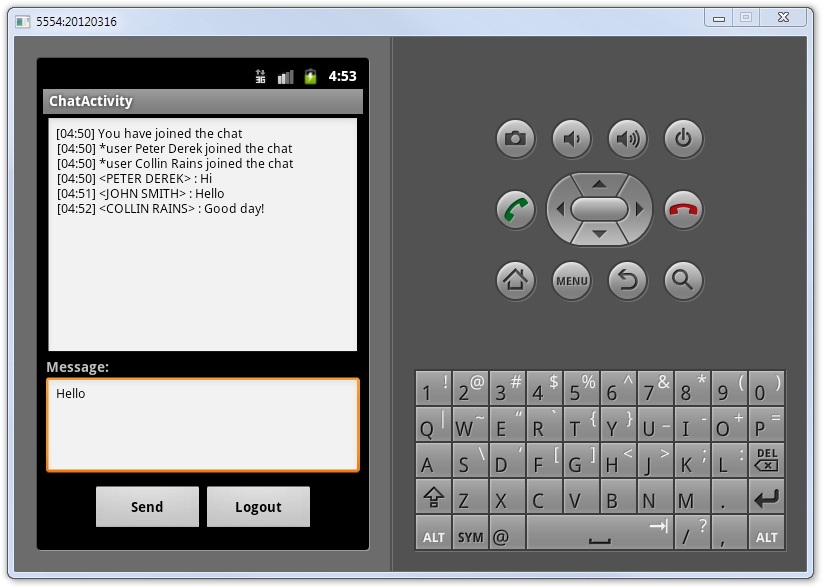
This sample presents a small chat program allowing to send text messages over the local network or the Internet. The sample demonstrates how server callback events can be consumed by an application written in Java using the EventReceiver class.
Server Requirements
This sample can work together with the HTTP Chat Sample (Delphi) server or with the HTTP Chat Sample (.NET) server.
Getting Started
To test the sample you will need to start and activate the sample server for your preferred platform somewhere on the network. Then you can start two or more client applications on different platforms.
Check the AndroidHTTPChatActivity class to modify the following defined URL:
var lURI := new URI("http://10.0.2.2:8099/bin");
URI lURI = new URI("http://10.0.2.2:8099/bin");
Log in with different user names on different clients, try to post text messages to the common chat and see how they appear. All chat events are initiated from the user session on the server. You can try server-initiated events, there are two events of this kind supported. By clicking the corresponding button on the server form you can either warn all clients about an upcoming server shutdown or kick a user from the chat. From the client point of view there is no difference in how the events are initiated.
Examine the Code
Let's take a look how the event receiver is set up and how the client is being registered to receive particular events:
method AndroidHTTPChatActivity.initialize;
begin

  // Setting up the login service, chat service and event receiver
  var lURI := new URI("http://10.0.2.2:8099/bin");
  aLoginService := new LoginService_Proxy(lURI);
  aChatService := new HTTPChatService_Proxy(aLoginService.ProxyMessage, aLoginService.ProxyClientChannel);
  aChatReceiver := new EventReceiver(aLoginService, "HTTPChat");
  aChatReceiver.AdjustPollInterval := false;
  aChatReceiver.start;
  aChatReceiver.pause;
  // ...

  // Registering the client
  aLoginButton.OnClickListener := new interface View.OnClickListener(onClick :=
  method(v : View) begin
    var lUserLogin : String := aUsernameFiled.Text.toString;
    if assigned(lUserLogin) then
      try
        var lUserID : String := getLoginService.Login(lUserLogin);
        if assigned(lUserID) then begin
          getReceiver.resume;
          var lIntent := new Intent().setClass(self, typeOf(ChatActivity));
          startActivityForResult(lIntent, 1);
        end
        else
          Toast.makeText(self, "Login failed", Toast.LENGTH_LONG).show;
      except
        on E:Exception do
          Log.e("AndroidHTTPChatActivity", "initialize: " + E.Message);
      end;
  end
  );
  // ...

end;
private void initialize() {
  URI lURI = null;
  try {
    lURI = new URI("http://10.0.2.2:8099/bin");
  } catch (URISyntaxException e) {
    Log.e("AndroidHTTPChatActivity", "URISyntaxException: " + e.getMessage());
  }

  // Setting up the login service, chat service and event receiver
  aLoginService = new LoginService_AsyncProxy(lURI);
  aChatService = new HTTPChatService_AsyncProxy(aLoginService.getProxyMessage(), aLoginService.getProxyClientChannel());
  aChatReceiver = new EventReceiver(aLoginService, "HTTPChat");
  aChatReceiver.setAdjustPollInterval(false);
  aChatReceiver.start();
  aChatReceiver.pause();
  // ...

  // Registering the client (asynchronous login)
  aLoginButton.setOnClickListener(new View.OnClickListener() {
    @Override
    public void onClick(View v) {
      String lUserLogin = aUsernameFiled.getText().toString();
      if (( lUserLogin != null ) && ( lUserLogin.length() > 0 )) {
        try {
          getLoginService().beginLogin(lUserLogin, true, new AsyncRequest.IAsyncRequestCallback() {
            @Override
            public void completed(AsyncRequest arg0) {
              String lUserID = getLoginService().endLogin(arg0);
              if (( lUserID != null ) && ( lUserID.length() > 0 )) {
                getReceiver().resume();
                Intent lIntent = new Intent().setClass(AndroidHTTPChatActivity.this, ChatActivity.class);
                startActivityForResult(lIntent, 1);
              }
            }
            @Override
            public void failed(AsyncRequest arg0, Exception arg1) {
              Log.e("beginLogin", "failed: " + arg1.getMessage());
            }
          });
        } catch(Exception e) {
          Log.e("AndroidHTTPChatActivity", "initialize: " + e.getMessage());
        }
      }
    }
  });
  // ...

}
The unregistering and stopping action:
aLogoutButton.OnClickListener := new interface View.OnClickListener(onClick :=
method(v : View);
begin
  AndroidHTTPChatActivity.getLoginService.Logout;
  var lIntent : Intent := Intent;
  setResult(Activity.RESULT_OK, lIntent);
  finish;
end);
aLogoutButton.setOnClickListener(new View.OnClickListener() {
  @Override
  public void onClick(View v) {
    AndroidHTTPChatActivity.getLoginService().beginLogout(true, new AsyncRequest.IAsyncRequestCallback() {
      @Override
      public void completed(AsyncRequest arg0) {
        Intent lIntent = getIntent();
        setResult(Activity.RESULT_OK, lIntent);
        finish();
      }
      @Override
      public void failed(AsyncRequest arg0, Exception arg1) {
        Log.e("beginLogout", "failed: " + arg1.getMessage());
      }
    });
  }
});
Let's take a look at the event handling methods:
AndroidHTTPChatActivity.getReceiver.addListener(new interface IHTTPChatEvents(OnLogin :=
  method(aEvent : OnLoginEvent) begin
  // ...
  end));
AndroidHTTPChatActivity.getReceiver.addListener(new interface IHTTPChatEvents(OnLogout :=
  method(aEvent : OnLogoutEvent) begin
  // ...
  end));
AndroidHTTPChatActivity.getReceiver.addListener(new interface IHTTPChatEvents(OnSendMessage :=
  method(aEvent : OnSendMessageEvent) begin
  // ...
  end));
AndroidHTTPChatActivity.getReceiver.addListener(new interface IHTTPChatServerEvents(OnSystemShutdown :=
  method(aEvent : OnSystemShutdownEvent) begin
  // ...
  end));
AndroidHTTPChatActivity.getReceiver.addListener(new interface IHTTPChatServerEvents(OnMandatoryClose :=
  method(aEvent : OnMandatoryCloseEvent) begin
  // ...
  end));
AndroidHTTPChatActivity.getReceiver().addListener(new IHTTPChatEvents_Adapter() {
  @Override
  public void OnLogin(final OnLoginEvent aEvent) {
    // ...
  }
});
AndroidHTTPChatActivity.getReceiver().addListener(new IHTTPChatEvents_Adapter() {
  @Override
  public void OnLogout(final OnLogoutEvent aEvent) {
    // ...
  }
});
AndroidHTTPChatActivity.getReceiver().addListener(new IHTTPChatEvents_Adapter() {
  @Override
  public void OnSendMessage(final OnSendMessageEvent aEvent) {
    // ...
  }
});
AndroidHTTPChatActivity.getReceiver().addListener(new IHTTPChatServerEvents_Adapter() {
  @Override
  public void OnSystemShutdown(final OnSystemShutdownEvent aEvent) {
    // ...
  }
});
AndroidHTTPChatActivity.getReceiver().addListener(new IHTTPChatServerEvents_Adapter() {
  @Override
  public void OnMandatoryClose(final OnMandatoryCloseEvent aEvent) {
    // ...
  }
});