HTTP Chat sample (JavaScript)
Overview
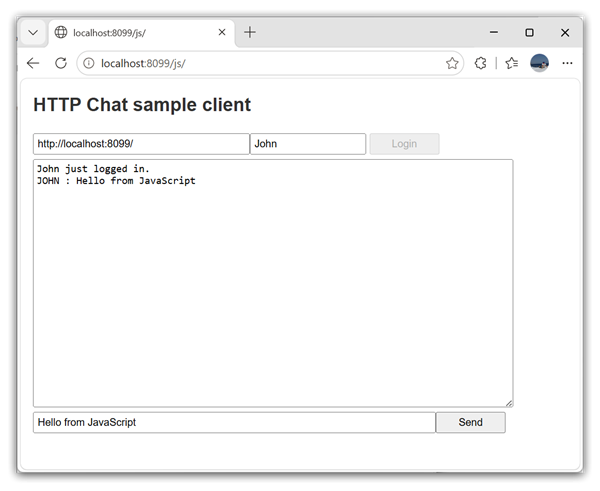
This sample presents a basic chat application allowing to send text messages over the local network or Internet. It demonstrates how server callback events can be consumed by a web application written with JavaScript.
Server Requirements
This sample can work together with the HTTP Chat Sample (Delphi) server or with the HTTP Chat Sample (.NET) server.
Getting Started
To test the sample, you need to start and activate the sample server for your preferred platform somewhere on the network. If you are using .NET, switch it to use JSON message. Then start your web browser and open http://localhost:8099/js/ (localhost can be replaced with the actual address), or open \RemObjects Samples\RemObjects SDK for JavaScript\HTTP Chat\index.html directly from the disk. You may also use Windows clients in addition to the Web client.
Set the server address in the client form and log in with different user names on different clients, then try to post text messages to the common chat and see how they appear.
Examine the Code
index.html contains all user code, HTML and Javascript; The following are the most essential parts:
The login() function sets up the required objects and event handlers and then logs into the server to get the event receiver to start polling the server for events. Note that logging in and out is handled by a separate LoginService, while chat messages go through the HTTPChatService; both share the same channel and message.
function login() {
    var channel = new RemObjects.SDK.HTTPClientChannel(document.getElementById("server-name").value + "json");
    var message = new RemObjects.SDK.JSONMessage();
    loginsvc = new HTTPChatLibrary.LoginService(channel, message);
    svc = new HTTPChatLibrary.HTTPChatService(channel, message);
    er = new RemObjects.SDK.EventReceiver(channel, message, "", 1000);

    er.addHandler("OnLogin", function (event) {
        log(event.aUserInfo.UserID + " just logged in.");
    });
    er.addHandler("OnLogout", function (event) {
        log(event.aUserID + " just logged out.");
    });
    er.addHandler("OnSendMessage", function (event) {
        log(event.aSenderUserID + " : " + event.aMessage);
    });

    loginsvc.Login(document.getElementById("user-name").value, function (msg) {
        er.setActive(true);
    }, RemObjects.UTIL.showError);
}
The send() function sends the message to the server.
function send() {
    svc.SendMessage(document.getElementById("chat-line").value, "", function (msg) {
    }, RemObjects.UTIL.showError);
}