Connecting to a Remoting SDK Server
Remoting SDK makes it easy to turn any existing Delphi project into a Remoting SDK client and have it talk to your Server. Simply select "Connect to Remoting SDK Server…" from the "Tools → Remoting SDK and Data Abstract" menu:
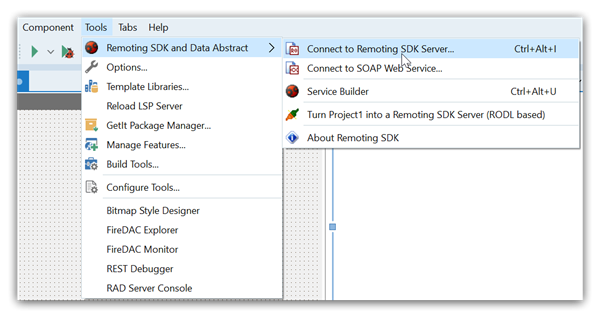
This option is available for any project, regardless of whether it uses Remoting SDK yet or not.
Selecting it will bring up this dialog. Choose "Connect to a Server from the Web by its URL" and specify the URL of your service (complete with port and path to RODL, so commonly that will end in :8099/bin), or pick "Import a local .RODL file" to browse for a local .RODL file on disk. Two checkboxes let you tune the generated code: "Ignore Data Abstract" and "Generate Async types" (the latter adds asynchronous _Async/_AsyncEx proxy variants):
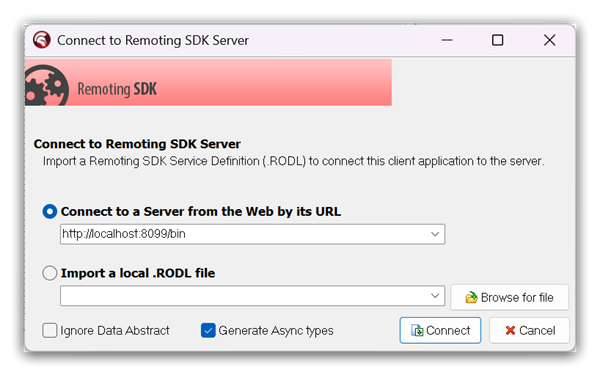
Note: HTTP, SuperHTTP, TCP and SuperTCP server are supported via specifying http://, superhttp://, tcp:// or supertcp://. DLL server is supported via 'file:///path/server.dll'
Enter your server's address and click "Connect", and Remoting SDK will automatically retrieve the RODL, process it, and generate a handful of new files for your project, all using your server's name as the base name:
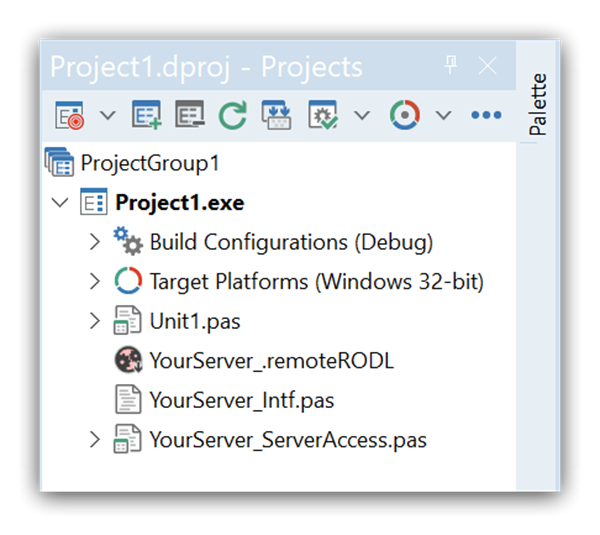
The three files are:
- a
.remoteRODLfile - an
_Intfsource file - a
_ServerAccesssource file with matching.dfm
The YourServer.remoteRODL File is a small XML file that serves as the link between your project and the remote server, for this conversion and for future updates. Essentially, it just contains the URL of your server (or of the local .RODL file, if you selected one), and is provided for easy access to working with the server from the IDE. For example, you can update your code to changes in the server via this file, as explained in the Working with .remoteRODL Files topic.
The YourServer_Intf source file contains code generated by Remoting SDK to let you interact with the server. This includes interfaces/protocols for all the Remote Services exposed by your server, as well as any helper types these services use, such as custom enums or structs. You should not touch the code in this file, as it will be re-generated (thus losing any changes you make to it) when you update it to changes on the server. You can read more about _Intf files here.
Finally, the YourServer_ServerAccess source file and matching .DFM contains a small helper class (based on a Data Module ) that provides a convenient starting point for encapsulating the access to your server from within your client app, alongside all the non-visual components needed for that. Once created, this file becomes "yours", and you will most likely expand it to expose functionality more specific to your concrete server.
The ServerAccess class is merely a suggestion and an assistance to get you started, you can feel free to simply remove the file from your project, if you want to structure your server access differently within the client app.
The ServerAccess Class
Let's have a closer look at what's inside the ServerAccess class. It's a singleton, accessible via the global ServerAccess function. It encapsulates your server URL and the Remoting SDK components needed for the communication – the Client Channel and Message – and exposes your service proxies as properties (with _Async/_AsyncEx variants when async generation is enabled).
Of course it is up to you to decide which aspects of this fit your application's design, and which need changing. For example, you might not want to expose all service proxies publicly, but instead encapsulate access to certain services with bespoke wrapper methods you add to ServerAccess yourself.
A typical generated ServerAccess class looks like this:
type
  TServerAccess_YourServer = class(TDataModule)
  private
    fServerUrl: String;
    function get__ServerUrl: String;
    function get__YourService: IYourService;
    // ... one getter per service, plus matching _Async / _AsyncEx variants
  public
    property ServerUrl: String read get__ServerUrl;
    property YourService: IYourService read get__YourService;
    // ... _Async / _AsyncEx proxy properties
  published
    Message: TROBinMessage;
    Channel: TROIndyHTTPChannel;
    procedure DataModuleCreate(Sender: TObject);
    procedure ChannelLoginNeeded(Sender: TROTransportChannel; anException: Exception; var aRetry: Boolean);
  end;

// The singleton is reached through this global function:
function ServerAccess: TServerAccess_YourServer;

// ...

const SERVER_URL = 'http://localhost:8099/bin';

procedure TServerAccess_YourServer.DataModuleCreate(Sender: TObject);
begin
  Self.fServerUrl := SERVER_URL;
  Self.Channel.TargetUrl := Self.fServerUrl;
end;

function TServerAccess_YourServer.get__YourService: IYourService;
begin
  result := CoYourService.Create(Self.Message, Self.Channel);
end;
The connect wizard generates the equivalent ServerAccess class for C++Builder projects, exposing the same members – the server URL, the Channel and Message components and the service-proxy accessors – in C++ syntax.