RO Photos sample (.NET)
Overview
This sample demonstrates how to transfer binary data — JPEG photos — between a client and a server using Remoting SDK. The server exposes a small photo library over HTTP and lets a client list, upload, and download photos, with thumbnails generated on the server side.
The sample ships with both a .NET server (PhotoServer) and a .NET client (PhotoClient). The same server can also serve the iOS and Android Photo clients, so it can be discovered over the network via ZeroConf/Bonjour.
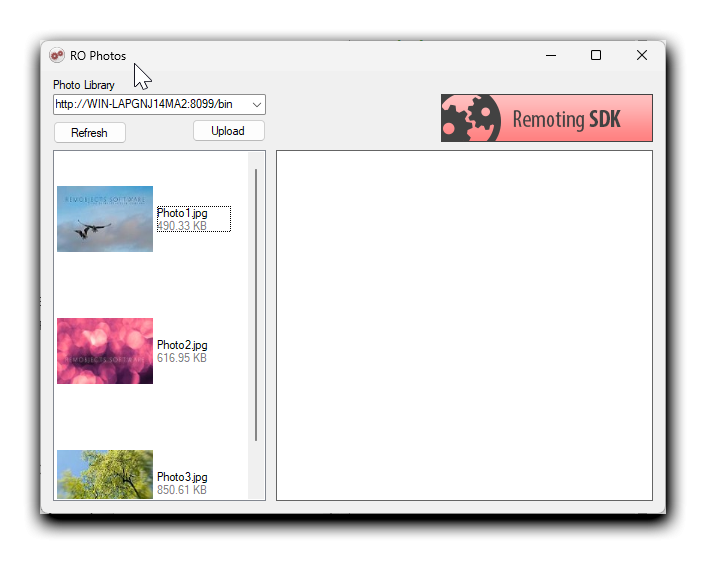
Architecture
Server (PhotoServer): a WinForms application hosting an IpHttpServerChannel on port 8099 with a BinMessage dispatcher (bin). It registers itself through ZeroConfRegistration so mobile clients can discover it automatically. Photos are stored as files in a Library folder created next to the executable on first run.
Client (PhotoClient, window title RO Photos): a WinForms application with an IpHttpClientChannel pointed at http://localhost:8099/bin and a matching BinMessage. It also carries a ZeroConfBrowser that fills a drop-down with the servers it discovers on the network; the channel's TargetUrl is taken from the selected entry, and the Refresh/Upload buttons stay disabled until a server is selected. All service calls are made asynchronously so the UI never freezes during a transfer.
The service contract (IPhotoServerService) exposes three operations and two structures:
| Operation | Returns | Purpose |
|---|---|---|
GetPhotosList() |
PhotoArray |
list all photos with their thumbnails |
UploadPhoto(name, data) |
PhotoInfo |
upload a JPEG, returns its info + thumbnail |
DownloadPhoto(name) |
Binary |
download the full-size JPEG |
PhotoInfo carries Name, Size and a Thumbnail (Binary); PhotoArray is an array of PhotoInfo.
Getting started
- Make sure a ZeroConf facility (Bonjour) is installed and running — the client discovers the server over the network and will not enable its buttons until a server is found.
- Compile the entire solution.
- Run the server (
PhotoServer). On first launch it creates aLibraryfolder next to the executable. - Run the client (
PhotoClient). Once the server is discovered it appears in the drop-down at the top — select it. The Refresh and Upload buttons become enabled only after a server is selected. - Click Refresh to load the list of photos from the server.
- Click Upload to open the upload dialog, click Browse to pick a JPEG, give it a name and confirm — the photo is sent to the server and added to the library.
- Select a photo from the list to download it and preview the full-size image.
Examine the code
Server: channel, message and ZeroConf
The server is configured entirely through components on the main form — an IpHttpServerChannel listening on port 8099, a BinMessage registered under the bin dispatcher, and a ZeroConf registration so the server is discoverable on the local network:
this.serverChannel = new RemObjects.SDK.Server.IpHttpServerChannel(this.components);
this.message = new RemObjects.SDK.BinMessage();
this.serverChannel.Dispatchers.Add(new RemObjects.SDK.Server.MessageDispatcher("bin", this.message));
this.serverChannel.HttpServer.Port = 8099;
this.message.ContentType = "application/octet-stream";
Server: the service implementation
The service stores photos in a Library folder created on construction:
_sharedFolder = Directory.GetCurrentDirectory() + @"\Library";
if (!Directory.Exists(_sharedFolder))
    Directory.CreateDirectory(_sharedFolder);
GetPhotosList scans the folder for *.jpg / *.jpeg files and returns each one as a PhotoInfo with a server-generated thumbnail:
public virtual PhotoArray GetPhotosList()
{
    DirectoryInfo dirinfo = new DirectoryInfo(_sharedFolder);
    List<FileInfo> files = new List<FileInfo>();
    files.AddRange(dirinfo.GetFiles("*.jpg"));
    files.AddRange(dirinfo.GetFiles("*.jpeg"));

    PhotoArray result = new PhotoArray();
    foreach (FileInfo fileInfo in files)
    {
        PhotoInfo photoInfo = new PhotoInfo { Name = fileInfo.Name, Size = fileInfo.Length };
        photoInfo.Thumbnail = ThumbnailFromImage(fileInfo.FullName);
        result.Add(photoInfo);
    }
    return result;
}
Thumbnails are produced by scaling the image down to a fixed width and re-encoding it as JPEG into a Binary:
Image thumb = image.GetThumbnailImage(tumbWidth, tumbHeight, () => false, IntPtr.Zero);
using (MemoryStream stream = new MemoryStream())
{
    thumb.Save(stream, System.Drawing.Imaging.ImageFormat.Jpeg);
    return new Binary(stream.ToArray());
}
UploadPhoto writes the received bytes to disk and returns the new photo's info, while DownloadPhoto reads the file back as a Binary (throwing FileNotFoundException if it is missing):
public virtual PhotoInfo UploadPhoto(string photoName, Binary photoData)
{
    string fullName = FullFileNameForPhoto(photoName);
    File.WriteAllBytes(fullName, photoData.GetBuffer());
    FileInfo file = new FileInfo(fullName);
    return new PhotoInfo { Name = file.Name, Size = file.Length, Thumbnail = ThumbnailFromImage(fullName) };
}

public virtual Binary DownloadPhoto(string photoName)
{
    string fullName = FullFileNameForPhoto(photoName);
    if (!File.Exists(fullName))
        throw new FileNotFoundException(String.Format("Photo {0} does not exists in the library.", photoName));
    return new Binary(File.ReadAllBytes(fullName));
}
Client: calling the service asynchronously
The client uses the generated async proxy so the UI never blocks while data is transferred. Each call follows the Begin…/End… pattern, with the result marshalled back onto the UI thread:
PhotoServerService_AsyncProxy lPhotoService = new PhotoServerService_AsyncProxy(this.message, this.channel);
lPhotoService.BeginGetPhotosList(ar =>
{
    PhotoArray lArray = lPhotoService.EndGetPhotosList(ar);
    // update the thumbnail list on the UI thread...
}, null);
Downloads and uploads work the same way (BeginDownloadPhoto / BeginUploadPhoto), decoding the returned Binary into an Image or sending the selected file's bytes to the server.
Concepts Covered
- Binary data and the
Binarytype - BinMessage
- IpHttpServerChannel
- Asynchronous Calls
- ZeroConf service discovery