Webservice Client sample (.NET)
Overview
This sample shows how to consume a third-party SOAP web service from a .NET application using Remoting SDK — no RO SDK server is involved on the other end. It imports the WSDL of a public Number Conversion service and calls it through a generated proxy, just like any other Remoting SDK service.
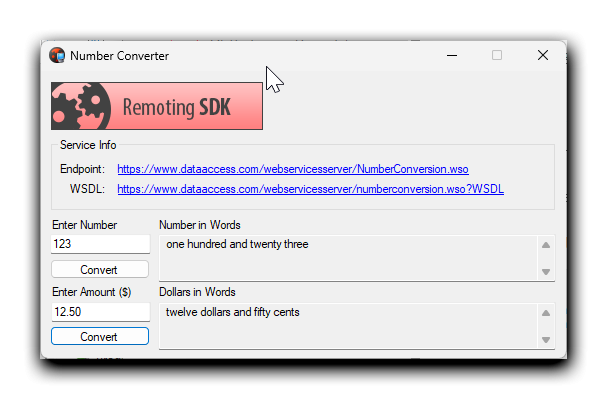
The client (window title Number Converter) talks to the live public service at
https://www.dataaccess.com/webservicesserver/NumberConversion.wso and offers two conversions:
- a whole number → its spelled-out words (e.g.
123→ one hundred and twenty three) - a dollar amount → words (e.g.
12.50→ twelve dollars and fifty cents)
Architecture
There is no custom server — the endpoint is an external SOAP service. On the client side the sample uses Remoting SDK's SOAP support:
- a
SoapMessageto format requests and parse responses as SOAP, - an
IpHttpClientChannelwhoseTargetUrlpoints at the service endpoint over HTTPS, - a strongly-typed proxy (
INumberConversion) generated from the service's WSDL.
The proxy interface and its implementation come from importing the WSDL via RemObjects SDK → Import SOAP Web Service in Visual Studio, which produces the WebserviceXLibrary_Intf.cs file with the INumberConversion interface:
public interface INumberConversion : RemObjects.SDK.IROService
{
    string NumberToWords(long ubiNum);
    string NumberToDollars(System.Decimal dNum);
}
Getting started
- Compile and run the application. No server is needed — it calls a live public web service, so an internet connection is required.
- Enter a whole number and click Convert under Number in Words to see it spelled out.
- Enter a dollar amount and click Convert under Dollars in Words.
- The Service Info box links to the live WSDL and endpoint the sample was generated from.
Examine the code
The proxy is created once from the SoapMessage and IpHttpClientChannel components that were configured on the form (the channel's TargetUrl is the service endpoint):
private INumberConversion fNumberService = null;

public MainForm()
{
    InitializeComponent();
    fNumberService = CoNumberConversion.Create(soapMessage, clientChannel);
}
From there, calling the remote SOAP operation is a plain method call — input is validated, the proxy is invoked, and the returned string is shown:
private void buttonConvert_Click(object sender, EventArgs e)
{
    if (!long.TryParse(textBoxValue.Text, out long value))
    {
        MessageBox.Show("Please enter a valid long number");
        return;
    }

    try
    {
        string result = fNumberService.NumberToWords(value);
        textBoxResult.Text = result;
    }
    catch (Exception ex)
    {
        MessageBox.Show($"Error: {ex.Message}");
    }
}
NumberToDollars works the same way for a decimal amount. All the SOAP-specific details (action names, namespaces, document/literal style) are baked into the generated proxy, so the application code never deals with raw XML.